Golf Ledger for iPhone
Speak each hole. Get a clean scorecard.
Say your score, your putts and the shots you hit. Golf Ledger turns that note into a structured round on your iPhone. No account, no server.
- Free rounds
- 2
- One-time
- $4.99
- Subscription
- None
Heard
“Driver 250 down the middle, seven iron to the back edge, chipped to six feet, two putts.”
| Hole | Par | Score | Putts | FW | GIR |
|---|---|---|---|---|---|
| 7 | 4 | 5 | 2 | Hit | Missed |
Shots 3 · Putts 2 · Penalties 0 · Total 5
01How it works
Speak, review, keep.
One short note after each hole. The app does the counting.
-
1 Speak
Say how the hole went.
Tap record and talk the way you would to a playing partner: the score, the putts, the clubs. Your words are turned into text on the iPhone, and the audio is never saved.
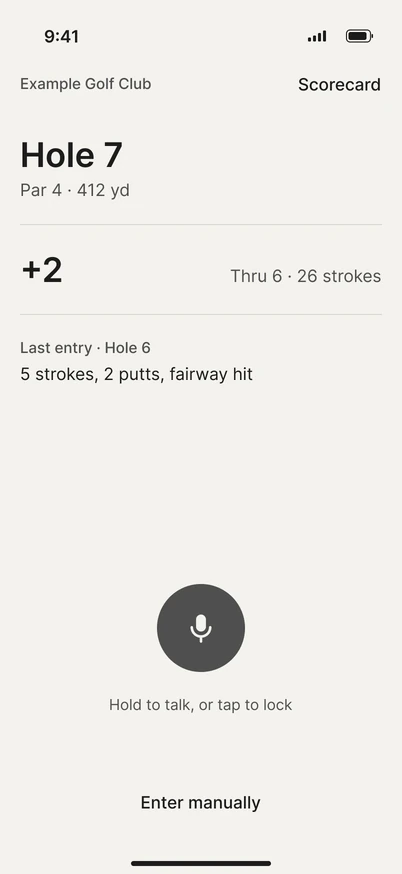
Capture. Design frame of the in-app screen. -
2 Review
Check the hole before it’s saved.
Score, putts, penalties, fairway and green are filled in from what you said. If the shots don’t add up to the score, it says so and offers a one-tap fix. Change anything, then save.
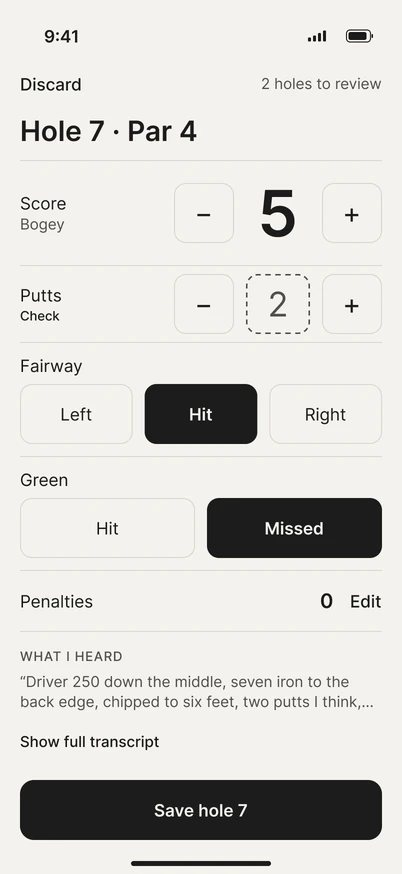
Review card. Design frame of the in-app screen. -
3 Keep
The round adds itself up.
Every hole goes on the scorecard. The round summary shows your total, putts, fairways, greens, and your best and toughest holes. Share a clean image of the card when you want to.
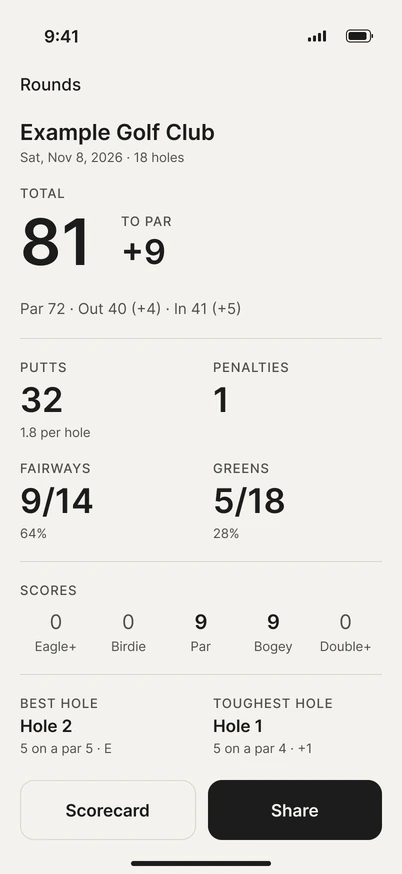
Round summary. Design frame of the in-app screen.


02Privacy
Your round stays on your iPhone.
Golf Ledger has nothing to sign in to and nowhere to send your data. It listens only while you record a note.
- Account
- None
- Servers
- None
- Analytics
- None
- Speech recognition
- On the iPhone
- Audio
- Never savedOnly the text note is kept with the hole.
- Rounds and notes
- Stored on the iPhone
- App Store privacy label
- Data Not Collected
03Price
$4.99, once.
Play two rounds free. If you want to keep going, one purchase lets you keep starting new rounds. There is no subscription.
- First 2 rounds
- Free
- After that
- $4.99 one-timeAn in-app purchase through Apple.
- Subscription
- None
- Family Sharing
- On
- Saved rounds
- Always readableWith or without the unlock.

04Questions
Short answers.
Do I need an account?
No. There is no account and no sign-in.
What happens to my voice?
Speech is turned into text on the iPhone while you record. The audio is never saved. Only the text note is kept with the hole.
Which iPhones does it work on?
Any iPhone that runs iOS 26. Voice notes work on all of them. On iPhones without Apple Intelligence, short phrases like “Driver, fairway, 4” read best.
What does it cost?
Your first two rounds are free. After that, a one-time $4.99 in-app purchase lets you keep starting new rounds. No subscription. Family Sharing is on. Saved rounds stay readable with or without the unlock.
What language does it understand?
US English.
Is it on the App Store?
Not yet. Golf Ledger is coming soon to the App Store.
05App Store
Coming soon.
Golf Ledger is coming to the App Store for iPhone with iOS 26. Two rounds free, then $4.99 once.
Coming soon to the App Store